
8
Crawlability
robots.txt rules, and specifically whether GPTBot, PerplexityBot, and ClaudeBot are permitted. Plus sitemap presence, whether its lastmod dates are trustworthy, redirect chains, and broken pages.
Free Chrome extension · 40 checks · runs in your browser
Ask ChatGPT or Perplexity to recommend a business like yours, and something decides whether your site is even readable to them. The AEO/GEO Auditor is a free Chrome extension from Advance Labs Inc. that runs 40 checks across 9 categories on whatever page you are looking at, then gives you a 0 to 100 AI-readiness score and a list of what to fix. Every check runs locally. Nothing about the page you audit is sent anywhere.
Add to Chromeor read the source on GitHub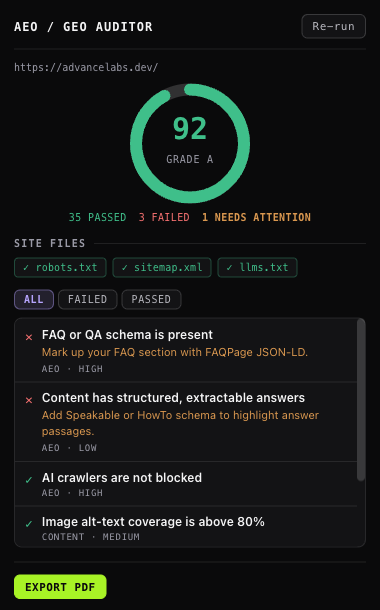
Most site audits were built for a web of blue links. They will tell you a title tag is too long and say nothing about whether an answer engine can identify who wrote your page, or whether your robots.txt quietly blocks the crawler that feeds ChatGPT. Those are different questions, and increasingly they are the ones that decide whether you get named.
This extension asks the second set. It is the same scoring engine behind our monthly AEO retainer, minus the cross-engine visibility tracking and the human work, given away because a tool that shows you the problem is the most honest advertisement for a service that fixes it.
40 checks, grouped the way the report groups them. Each one is a rule you can read in the repository:
robots.txt rules, and specifically whether GPTBot, PerplexityBot, and ClaudeBot are permitted. Plus sitemap presence, whether its lastmod dates are trustworthy, redirect chains, and broken pages.
Title presence and length, meta description presence and length, exactly one H1, valid heading hierarchy, and a declared page language.
Question-shaped headings, answerable depth, Organization identity consistency across pages, AI crawlers unblocked, llms.txt, and whether the page is extractable as paragraphs plus lists and tables.
Pages indexable with no accidental noindex, a declared canonical, canonicals that resolve somewhere real, and titles unique across pages.
Alt-text coverage that understands alt="" is the prescribed markup for a decorative image, internal linking, thin-content detection, and headings used to structure content.
JSON-LD presence and validity, read recursively so a typed node nested inside an @graph is visible at any depth.
OpenGraph completeness, Twitter Card, a declared mobile viewport, and HTTPS.
The extension has no server to send anything to. Analysis happens in the page you are already looking at, and the only requests it makes are to that site's own robots.txt, sitemap.xml, and llms.txt. There is no account, no analytics, and no telemetry. Full detail is in the privacy policy.
Answer Engine Optimization (AEO) is what decides whether ChatGPT, Perplexity, Claude, and Google's AI Overviews can read your page, understand it, and cite it. Traditional SEO gets you ranked in a list of links; AEO gets you quoted inside an answer. The signals overlap but they are not the same. An answer engine cares whether your markup identifies who wrote something, whether your content is extractable as discrete answers, and whether your robots.txt permits its crawler at all.
Install the AEO/GEO Auditor extension, open the page you want to check, and click the toolbar icon. It reads the live DOM plus the site's robots.txt, sitemap.xml, and llms.txt, then reports whether AI crawlers such as GPTBot, PerplexityBot, and ClaudeBot are permitted, whether your structured data identifies you, and whether your content is extractable. The audit takes a few seconds and never leaves your browser.
Yes. The extension is free with no account, no sign-up, and no usage limit, and the scoring engine behind it is open source under Apache-2.0 at github.com/Advance-Labs/aeo-toolkit. We also sell the work as a monthly retainer; the extension is not a trial of it and is not time-limited.
No. Every check runs locally in your browser. There is no account, no server, no analytics, and no telemetry, and no audit is stored anywhere because no audit is stored at all. The only network requests the extension makes are to the audited site's own robots.txt, sitemap.xml, and llms.txt, which is why it asks for host permissions.
40 checks across 9 categories: crawlability including AI-crawler rules in robots.txt, crawl hints such as sitemap.xml freshness and llms.txt, indexing signals, metadata quality, structured data validity covering Organization, Article, FAQPage, BreadcrumbList and Speakable, answer-engine readiness, content depth and alt-text coverage, social cards, mobile viewport, and HTTPS.
llms.txt is an emerging convention for telling answer engines what a site is about, in plain text at the site root, in the same spirit as robots.txt but aimed at comprehension rather than permission. It is not yet a formal standard and no engine is obliged to read it, which is why the extension reports its presence as a crawl hint rather than scoring a site as broken for lacking one.
Tell us, because that is a bug in the engine and we treat it as one. Version 0.2.0 shipped three such fixes: an empty alt attribute is the correct markup for a decorative image and is no longer counted as missing alt text, typed nodes nested inside an @graph are now read at any depth so markup written the way Google documents it scores correctly, and checks that do not apply to a page are dropped rather than failed, since a homepage is the root of a breadcrumb trail and is not an article.
How we found those three bugs, and how to check any audit finding by hand: we audited our own site and half the failures were false positives.
Free, open source, and about four seconds per page.
Add to Chrome