
Troubleshooting MCP connections
Both servers are hosted, so almost every problem is the URL, the sign-in or a doubled registration. Work through the checks in this order.
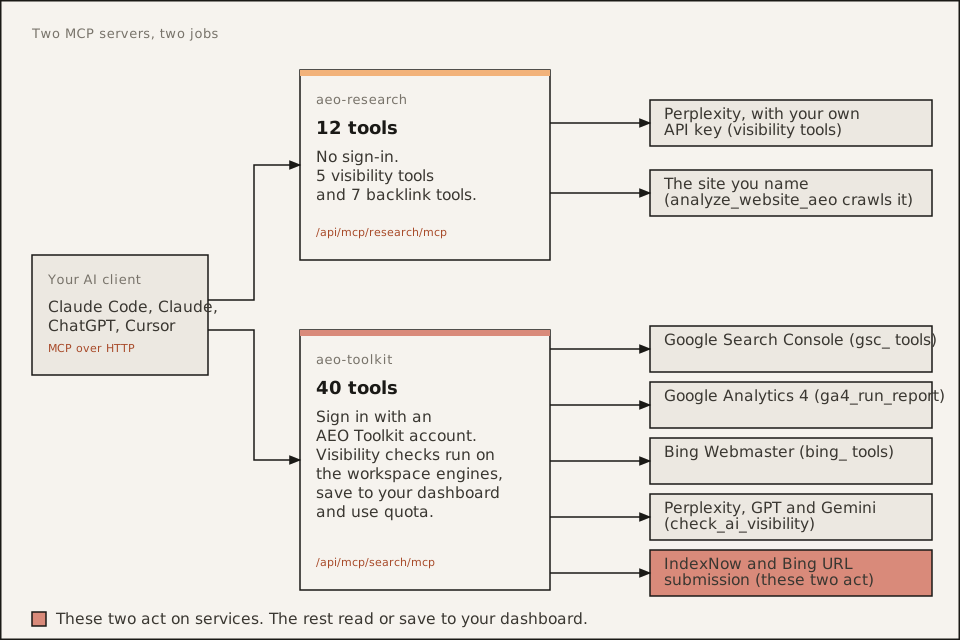
The URL must end in /mcp
| Server | Endpoint |
|---|---|
| aeo-research | https://aeo.advancelabs.dev/api/mcp/research/mcp |
| aeo-toolkit | https://aeo.advancelabs.dev/api/mcp/search/mcp |
The trailing /mcp is part of the endpoint. A URL that stops at /api/mcp/research or /api/mcp/search does not connect. The aeo-toolkit endpoint keeps search in its path because it kept the original URL. The name changed and the path did not.
Check what your client has:
claude mcp listIf an entry has the wrong URL, remove it and add it again:
claude mcp remove aeo-toolkitclaude mcp add --transport http --scope user aeo-toolkit https://aeo.advancelabs.dev/api/mcp/search/mcp401 or “needs authentication” on aeo-toolkit
This is expected on a first connection. The aeo-toolkit server answers an anonymous request with a 401 that points your client at the AEO Toolkit sign-in. The client then opens a browser.
In Claude Code:
- Run
/mcp. - Select aeo-toolkit.
- Choose Authenticate and sign in with your AEO Toolkit account.
If the 401 stays after you sign in:
- Your client may not support MCP sign-in. aeo-toolkit works only in clients that do. A client without it cannot use the server. Use aeo-research there, which needs no sign-in.
- The sign-in may have lapsed. Run
/mcpand choose Authenticate again. - You may be signed in to the wrong account. The tools use the workspace and the Google, Bing and AI keys saved on that account.
The root /.well-known/oauth-* documents return 404 on purpose. They are scoped to the aeo-toolkit path, so the keyless aeo-research server is never pulled into a login. A 404 on the root path is not a fault.
Duplicate tools after installing the plugin
The plugin registers its own copies of both servers. If you also added them by hand, your client lists every tool twice, once from each registration.
Remove the hand-added ones and keep the plugin’s:
claude mcp remove aeo-researchclaude mcp remove aeo-toolkitThen restart the session and run claude mcp list. If you want the servers without the skills, do the reverse: uninstall the plugin and keep the manual entries. Pick one route.
The server connects but a tool fails
- Google tools return no sites. Connect Google on your AEO Toolkit project first.
list_gsc_sitesshould then return your properties.https://example.com/andsc-domain:example.comare different properties. - Bing tools fail. They need a Bing Webmaster key saved on the project.
- Visibility tools stop or refuse. On aeo-toolkit these run on the workspace’s engines and use quota. Plan allowances are on the pricing page. On aeo-research they use your own Perplexity key, so check that the key is valid.
- A tool looks missing. aeo-research has 12 tools and aeo-toolkit has 40. If you see far fewer, the server did not finish connecting. Restart the client.
Two aeo-toolkit tools act on services and are worth knowing about: submit_indexnow and submit_to_bing send URLs for indexing. The others read.
Still stuck
Check that the endpoint answers at all:
curl -i https://aeo.advancelabs.dev/api/mcp/search/mcpA 401 with a WWW-Authenticate header means the server is up and wants a sign-in. Then see Where to find and install AEO Toolkit for the install line for each client, or open an issue on GitHub.
AEO Toolkit is an open-source instrument by Advance Labs.