
Diagnose a traffic drop
Who it is for
An SEO, site owner or developer whose organic clicks fell and who needs a specific, evidenced answer.
The job
Name the pages that lost the clicks. Say whether the loss is a few pages or the whole site. Separate lost rankings from lost demand.
Tools and skills
On the aeo-toolkit server. Sign in with your AEO Toolkit account. Connect Google on your project first.
list_gsc_siteslists your Search Console properties.gsc_traffic_dropattributes the change between two periods by page or by query.compare_periodscompares two ranges.gsc_decayfinds pages slowly losing traffic.gsc_url_inspectchecks Google’s index status for up to 25 URLs per call. It is read-only.list_ga4_propertiesandga4_run_reportlet you check whether analytics agrees.
The method is in the seo-traffic-drop skill. Related skills: seo-content-decay and seo-cannibalization.
Steps
- Call
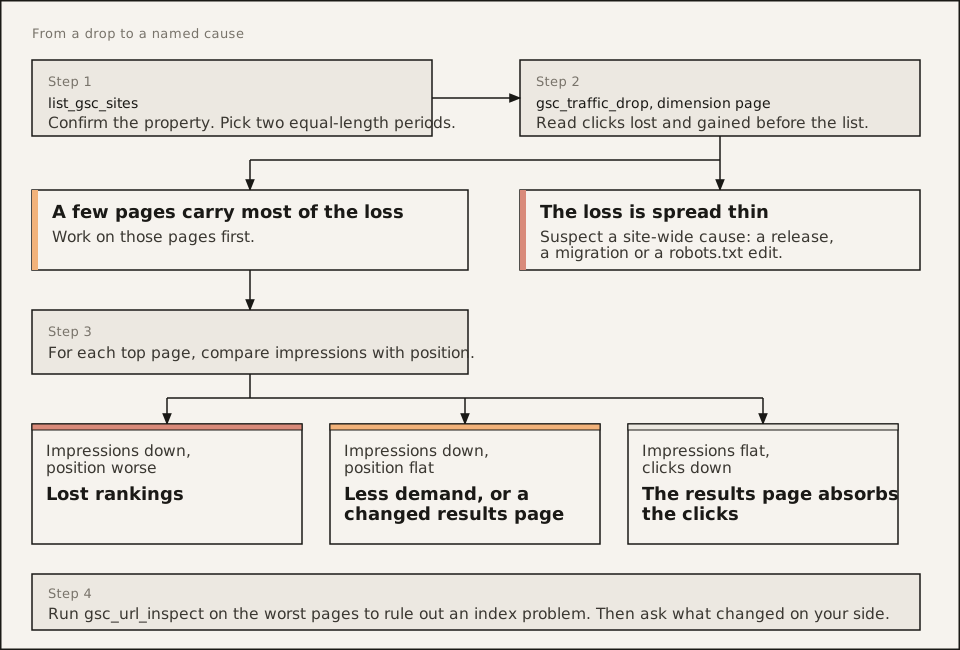
list_gsc_sitesand confirm the property.https://example.com/andsc-domain:example.comare different properties. - Pick two equal-length periods that align on weekdays. Comparing 30 days to 28 manufactures a drop.
- Run
gsc_traffic_dropwithdimension: 'page'. Read the clicks lost and gained before the list. - Look at each page’s share of the decline. A few pages carrying most of it points at those pages. A thin spread points at the whole site.
- For the top pages, compare the change in impressions with the change in position:
- impressions down and position worse: lost rankings
- impressions down and position flat: less demand, or a changed results page
- impressions flat, clicks down: something on the results page is absorbing clicks
- Re-run with
dimension: 'query'for the affected pages. One topic means a content or intent problem. Scattered queries suggest a technical or site-wide cause. - Run
gsc_url_inspecton the worst pages to rule out an index problem. - Ask what changed on your side: a release, a migration, a robots.txt edit.
What you get
A statement like “Clicks fell 2,400 between the two periods. Four pages account for 78% of that. All four lost rank, and impressions fell with them.” Then a next step per group of pages.
Limits
Search Console shows what happened, not why. It does not know about your deploys, your competitors or algorithm updates. State a cause only when the numbers and a known event line up, and call it a hypothesis.
AEO Toolkit is an open-source instrument by Advance Labs.