
Buyer questions
Each answer below traces to the product’s own pages or code, read on 2026-11-17. Prices and limits change, so the pricing page is the authority for those.
What is it?
AEO Toolkit helps a site get read and cited by AI answer engines. It has four parts:
- Six browser tools at advancelabs.dev/tools, including a 44-check technical and AEO audit and an E-E-A-T scanner.
- A dashboard that asks your buyer questions of AI engines on a schedule and records whether you are named.
- Two MCP servers that connect Claude, Cursor and other clients to the audit, citation checks, backlink research and your Search Console, GA4 and Bing data.
- A Chrome extension and 24 agent skills. The skills tell an agent how to fix what the audit finds.
Is it free, and what costs money?
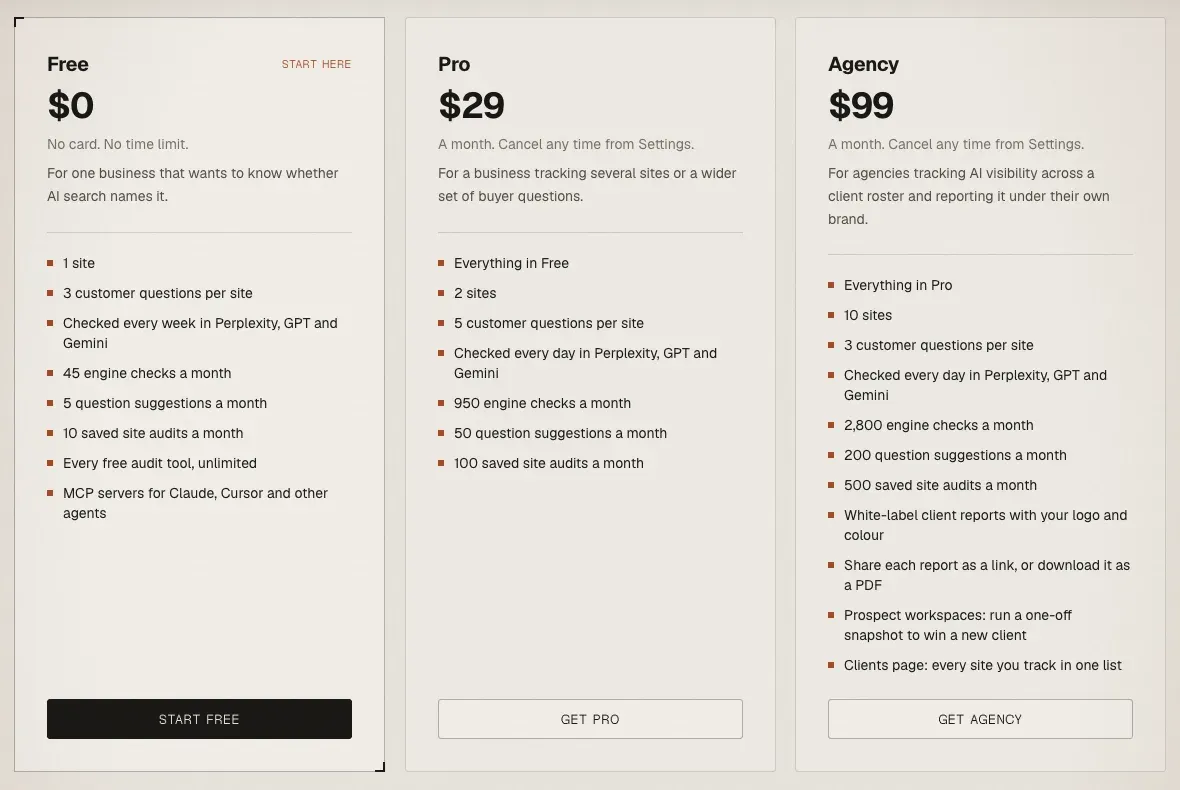
The browser audit tools need no account and no card. The Free plan is $0 with no card and no time limit.
| Plan | Price | Sites | Questions per site | Checks per month | Saved audits per month | Schedule |
|---|---|---|---|---|---|---|
| Free | $0 | 1 | 3 | 45 | 10 | Weekly |
| Pro | $29 a month | 2 | 5 | 950 | 100 | Daily |
| Agency | $99 a month | 10 | 3 | 2,800 | 500 | Daily |
Prices are in US dollars, per workspace. One check is one question asked of one engine. Agency adds white-label client reports, prospect workspaces and a Clients page. The Free plan includes the MCP servers.
Two things cost you money outside the plan. On the aeo-research server, citation checks use your own Perplexity API key, and outreach drafts use your own model provider key. Done-for-you AI search maintenance is a separate service, scoped on a call.
Do I need to sign in?
| Surface | Sign-in |
|---|---|
| Browser audit tools | No account |
| Chrome extension | No account |
| aeo-research MCP server | None |
| aeo-toolkit MCP server | An AEO Toolkit account. Your client opens a browser on first use. |
| Dashboard | An account |
Which AI engines does it measure?
It depends on where you run the check.
- aeo-research server tools (
check_ai_visibility,get_visibility_report,compare_competitor_visibility,discover_ranking_prompts) query Perplexity Sonar only, with your own Perplexity key. A result means “cited by Perplexity”. - The dashboard asks each question of Perplexity, GPT with live web search and Gemini. These are API answers, not screenshots of the consumer apps.
- The aeo-toolkit server’s visibility tools run against the engines configured for your workspace and save the result to your dashboard.
None of them measures whether a human sees your brand in the ChatGPT or Claude apps.
Is it read-only?
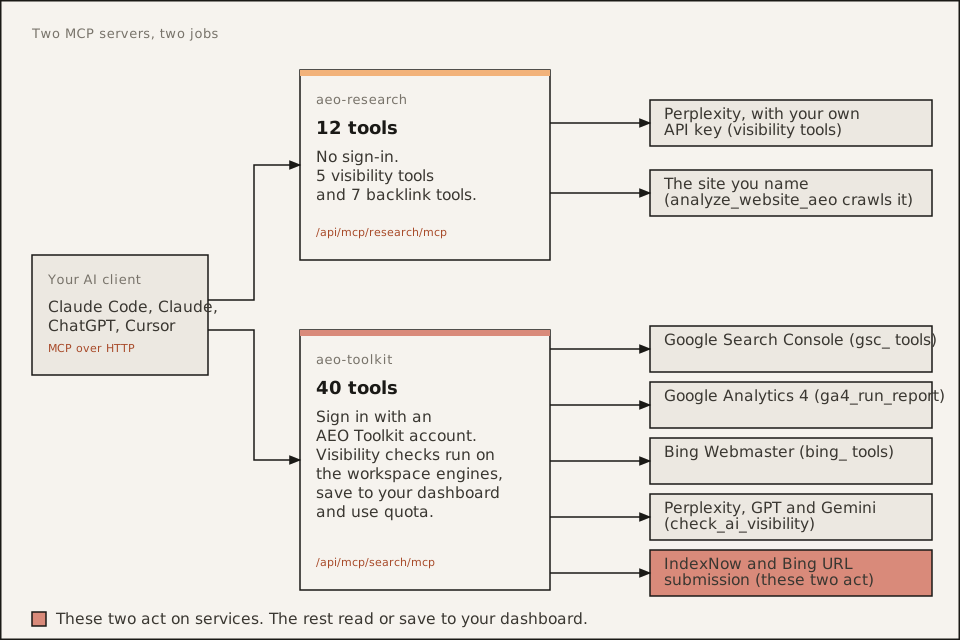
Almost. No tool edits your site, your Search Console, your GA4 property or your Bing settings. Some tools do more than read:
check_ai_visibility,get_visibility_reportanddiscover_ranking_promptson the aeo-toolkit server save results to your dashboard and draw on your monthly allowance.submit_indexnowandsubmit_to_bingsend URLs to IndexNow and Bing.
Everything on the aeo-research server is read-only.
What data do you store?
From the privacy policy:
- aeo-research server: stores no results and keeps no record of your calls beyond the host’s standard request logs. Keys you pass are used for that request only and are not saved or logged.
- aeo-toolkit server and dashboard: your email, the sites, questions and competitors you add, the results of checks and audits, and usage counts. Google connection tokens, Bing keys and saved AI provider keys are stored encrypted.
- Search Console, GA4 and Bing reports: fetched when you ask and not kept. The one exception is one weekly number per AI assistant for the GA4 property you pick for a project.
- Chrome extension: sends nothing about the page you audit. Its only network requests go to the audited site’s own
robots.txt,sitemap.xmlandllms.txt.
Deleting a project in Settings deletes its questions, runs, checks and audits. The policy names the processors that handle your data, and says some are based in the United States.
How does it compare with Semrush, Ahrefs or Profound?
It does not replace an SEO suite. It does not track rankings or index backlinks. Keep your suite for rankings and backlinks, and add AEO Toolkit for whether answer engines can read and quote the site and whether AI names you. The comparison pages say they did not compare feature lists or prices, because those change.
- AEO Toolkit and your SEO suite, which covers Semrush and Ahrefs
- Ahrefs Brand Radar: if you already use Ahrefs and want market-wide prompt data, Brand Radar is the closer fit.
- Profound: if you want a managed platform under an enterprise contract, Profound is the closer fit.
- Peec AI: if daily tracking and sentiment are what you need, Peec AI is the closer fit.
Each page carries the source and check date for its claims about the other product. We have no comparison page for other tools, so we make no claims about them here.
Can I use it from Claude, ChatGPT or Cursor?
Yes. Both servers are hosted Streamable-HTTP endpoints, so nothing installs locally. Claude Code, Claude.ai and Claude Desktop, ChatGPT and Cursor all work. The aeo-toolkit server needs a client that supports MCP sign-in. Commands are in Where to find and install AEO Toolkit.
Is it open source?
Partly. The audit engine, the Chrome extension and the agent skills are Apache-2.0, in this repository. The six npm packages are published under @advance-labs. The console and the hosted MCP servers are proprietary, run by Advance Labs and not self-hostable. The open core page draws the line.
What is in the Chrome extension?
AEO/GEO Auditor runs the same scoring engine on the page you have open. You get a 0 to 100 score with a letter grade, a filterable list of findings and a PDF export. It runs 44 checks across 9 categories from version 0.3.0. The 14 E-E-A-T signals are a separate scorer that the extension does not run. Details are on the Chrome extension page.
How do I cancel?
On a paid plan, the pricing page says you can cancel any time from Settings. Where self-serve checkout is not available, you ask and the team sets your plan up. To stop using an MCP server, remove it from your client, for example claude mcp remove aeo-research. To close your account or ask for your data to be deleted, use the contact route in the privacy policy.
AEO Toolkit is an open-source instrument by Advance Labs.